It is PROHIBITED on all standard stands:
For a full list of requirements and fines, see:Rules of participation in events in VK Timiryazev, posted by: texpo.ru/organizatoram/#docs
This Guide, the Rules for building stands with a Standard building
This Guide, the Rules for building stands with a Standard building
Self-pasting surfaces
You cannot glue any surfaces of the stand yourself.
Use any kind of glue or adhesive tape, independently bring and paste printed film and all its types on the stand, attach advertising elements and structures (flags, stickers, etc.) to the glue.
It is forbidden to protect the perimeter of the stand with any tape, tape, etc.
You cannot glue any surfaces of the stand yourself.
Use any kind of glue or adhesive tape, independently bring and paste printed film and all its types on the stand, attach advertising elements and structures (flags, stickers, etc.) to the glue.
It is forbidden to protect the perimeter of the stand with any tape, tape, etc.
If you need wallpapering of the stand:
The prohibition of self-pasting is contained in the Exhibition Participant's Guide, which is an appendix to the Application Agreement. The violation provides for a fine of 300% of the cost of the pasted equipment. During the entire period of the exhibition, the staff of the General Developer constantly monitors the condition of all the equipment of the stands. Violations are photographed and documented. The act is presented to the Organizer and based on it, the management company is fined.
- order wallpapering from the Organizer (see the section: Additional services);
- print the film yourself and order its sticker from the Organizer (see the section: Additional services);
- instead of pasting, place a banner on hooks on the walls or use static film that holds without pasting.
The prohibition of self-pasting is contained in the Exhibition Participant's Guide, which is an appendix to the Application Agreement. The violation provides for a fine of 300% of the cost of the pasted equipment. During the entire period of the exhibition, the staff of the General Developer constantly monitors the condition of all the equipment of the stands. Violations are photographed and documented. The act is presented to the Organizer and based on it, the management company is fined.
Attach your equipment to the stand structures
It is unacceptable to attach your equipment to the structures of the stand, drill holes, attach advertising and other materials with pins, buttons, stapler, hard-to-remove adhesive tape, etc.
The structural elements and equipment of the standard stand must remain intact after the exhibition and be cleaned of any contamination caused by the fault of the exhibitor. The cost of the damaged structural elements of the stand and additional equipment, as well as all costs associated with their restoration, will be recovered from the Exhibitor.
It is unacceptable to attach your equipment to the structures of the stand, drill holes, attach advertising and other materials with pins, buttons, stapler, hard-to-remove adhesive tape, etc.
The structural elements and equipment of the standard stand must remain intact after the exhibition and be cleaned of any contamination caused by the fault of the exhibitor. The cost of the damaged structural elements of the stand and additional equipment, as well as all costs associated with their restoration, will be recovered from the Exhibitor.
How to replace:
use S-shaped hooks to hang something on the walls of the stand without heavy elements;
order equipment from the Organizer (display cases, racks, podiums, etc.) to accommodate your exhibits and equipment (see the section: Add.equipment)
This prohibition is contained in the Exhibition Participant's Guide, which is an annex to the Application Agreement. The violation provides for a fine of 300% of the cost of the pasted equipment. During the entire period of the exhibition, the staff of the General Developer constantly monitors the condition of all the equipment of the stands. Violations are photographed and documented. The act is presented to the Organizer and based on it, the management company is fined.
use S-shaped hooks to hang something on the walls of the stand without heavy elements;
order equipment from the Organizer (display cases, racks, podiums, etc.) to accommodate your exhibits and equipment (see the section: Add.equipment)
This prohibition is contained in the Exhibition Participant's Guide, which is an annex to the Application Agreement. The violation provides for a fine of 300% of the cost of the pasted equipment. During the entire period of the exhibition, the staff of the General Developer constantly monitors the condition of all the equipment of the stands. Violations are photographed and documented. The act is presented to the Organizer and based on it, the management company is fined.
Make changes to electrical equipment (electrical installation and own lighting fixtures)
All electrical appliances and equipment of the Exhibitor connected to outlets must be certified. According to fire safety regulations, you cannot connect ANY of your own equipment to the network and use tees and extension cords. Electrical installation at the booth by the Exhibitor is not allowed. The independent connection of electrical appliances to the network is considered as an independent development and is subject to approval by the General Developer.
All electrical appliances and equipment of the Exhibitor connected to outlets must be certified. According to fire safety regulations, you cannot connect ANY of your own equipment to the network and use tees and extension cords. Electrical installation at the booth by the Exhibitor is not allowed. The independent connection of electrical appliances to the network is considered as an independent development and is subject to approval by the General Developer.
What to do:
Get accredited by the technical department of the Timiryazev Exhibition Center. It is necessary to provide a passport for each device with marks of its certification.
Use battery-powered LED lamps.
ATTENTION:
Get accredited by the technical department of the Timiryazev Exhibition Center. It is necessary to provide a passport for each device with marks of its certification.
Use battery-powered LED lamps.
ATTENTION:
- Power supply (connection and consumption of electricity) is not included in the price of the equipped exhibition area and outlets and must be ordered and paid FOR ADDITIONALLY.
- If you need additional sockets (220V or 380V), or round-the-clock power supply at the stand, which are not included in the standard equipment of your stand, they must be ordered and paid FOR ADDITIONALLY. (see the section: Additional services)
- The power supply ordered for your stand (connection and consumption of electricity – in kW) must correspond to the total total power (total number of kW, including starting currents) of all electrical equipment at your stand. Failure to comply with this requirement leads to a power failure and possible equipment failure, both at your stand and in the entire unit. The organizer reserves the right to impose a fine in the amount of the full cost of the equipment damaged due to the discrepancy between the order and the actual electricity consumption.
Use your own equipment from the exhibition designer and/or your own standard furniture
It is prohibited to place or mount MOBILE STANDS with electrical networks, any exhibition equipment and structures that are not exhibits of the exhibitor within the standard stand. Otherwise, this installation is considered as an independent construction of the exhibition area by the Exhibitor, and is subject to agreement on a paid basis with the Technical Department of the general developer, ArtCapital LLC.
It means:
It is prohibited to place or mount MOBILE STANDS with electrical networks, any exhibition equipment and structures that are not exhibits of the exhibitor within the standard stand. Otherwise, this installation is considered as an independent construction of the exhibition area by the Exhibitor, and is subject to agreement on a paid basis with the Technical Department of the general developer, ArtCapital LLC.
It means:
- You can't bring a mobile banner and plug it in. Only after approval in the technical department.
- You cannot bring your storefronts from a construction identical to the equipment of the General developer: storefronts, shelving, information stands, podiums.
- Your furniture (table, chair, cooler, leaf holder, etc.) equipment should be DIFFERENT from the equipment of the General Builder.
Equipped building area "STANDARD" (OCTANORM construction)
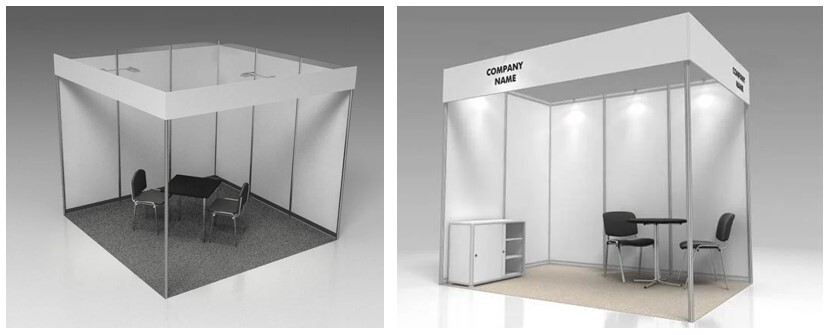
Standard booth package, built with the Octanorm system.
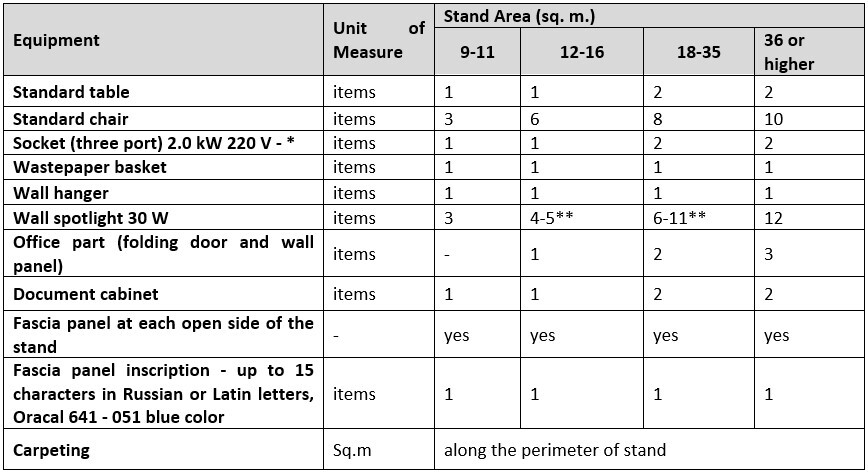
The Standard Stand package is constructed utilizing the Octanorm system and includes a comprehensive set of furniture and equipment, the quantity of which is scaled to your stand's area. For detailed specifications, please refer to the Standard Stand Package included in Equipment table.
The package features Raduga carpet flooring. The default color is blue (055), with sandy (113) available as an optional selection.
The Standard Stand package is constructed utilizing the Octanorm system and includes a comprehensive set of furniture and equipment, the quantity of which is scaled to your stand's area. For detailed specifications, please refer to the Standard Stand Package included in Equipment table.
The package features Raduga carpet flooring. The default color is blue (055), with sandy (113) available as an optional selection.
Standard Stand Specifications:
1. Construction & Dimensions
The stand is constructed from wall panels measuring 2500 mm in height and 1000 mm in width (dimensions include top and bottom planks). For detailed dimensional inquiries, please contact the Exhibition's Technical Department directly.
2. Ordering Additional Equipment
Additional equipment, furniture, and electrical appliances can be ordered via the Online Expo Configurator.
3. Fascia Panel Inscription
The standard stand configuration includes one fascia panel inscription featuring your company name (up to 15 characters, without spaces, in Latin or Cyrillic script) and the stand number.
Additional Signage & Logos: Additional text signs or company logos can be ordered through the Online Expo Configurator.
Logo Placement Requirements: To request logo placement and receive a precise quotation, please submit a vector file of the logo (in .ai or .eps format, no higher than CS3) to the Exhibition's Technical Department. The final cost is contingent upon the logo's manufacturing complexity. Please note that the inability to provide this artwork will result in the service being unavailable.
4. Standard Stand Content
Please refer to the attached "Standard Stand Content" table for a detailed list of included items.
Important Notice: Please be advised that should an Exhibitor decline any item from the standard package, the item is neither refundable nor exchangeable for other equipment or services. Any additional requirements must be ordered separately via the Online Expo Configurator.
Standard Stand Package: Included Equipment
The following equipment is included in the standard stand package, with quantities scaled according to the leased area.
The stand is constructed from wall panels measuring 2500 mm in height and 1000 mm in width (dimensions include top and bottom planks). For detailed dimensional inquiries, please contact the Exhibition's Technical Department directly.
2. Ordering Additional Equipment
Additional equipment, furniture, and electrical appliances can be ordered via the Online Expo Configurator.
3. Fascia Panel Inscription
The standard stand configuration includes one fascia panel inscription featuring your company name (up to 15 characters, without spaces, in Latin or Cyrillic script) and the stand number.
Additional Signage & Logos: Additional text signs or company logos can be ordered through the Online Expo Configurator.
Logo Placement Requirements: To request logo placement and receive a precise quotation, please submit a vector file of the logo (in .ai or .eps format, no higher than CS3) to the Exhibition's Technical Department. The final cost is contingent upon the logo's manufacturing complexity. Please note that the inability to provide this artwork will result in the service being unavailable.
4. Standard Stand Content
Please refer to the attached "Standard Stand Content" table for a detailed list of included items.
Important Notice: Please be advised that should an Exhibitor decline any item from the standard package, the item is neither refundable nor exchangeable for other equipment or services. Any additional requirements must be ordered separately via the Online Expo Configurator.
Standard Stand Package: Included Equipment
The following equipment is included in the standard stand package, with quantities scaled according to the leased area.
Notes:
The total power consumption of all equipment connected to the sockets must not exceed the rated power of the socket.
The exact quantity of wall spotlights is determined by the final stand layout and configuration.
Electrical power connection and consumption are not included in the stand rental fee and will be billed as an additional service.
The number of wall spotlights is calculated based on a standard ratio of one unit per three square meters of stand area.
The total power consumption of all equipment connected to the sockets must not exceed the rated power of the socket.
The exact quantity of wall spotlights is determined by the final stand layout and configuration.
Electrical power connection and consumption are not included in the stand rental fee and will be billed as an additional service.
The number of wall spotlights is calculated based on a standard ratio of one unit per three square meters of stand area.
OPTIMUM booth package, built with the MAXIMA system.
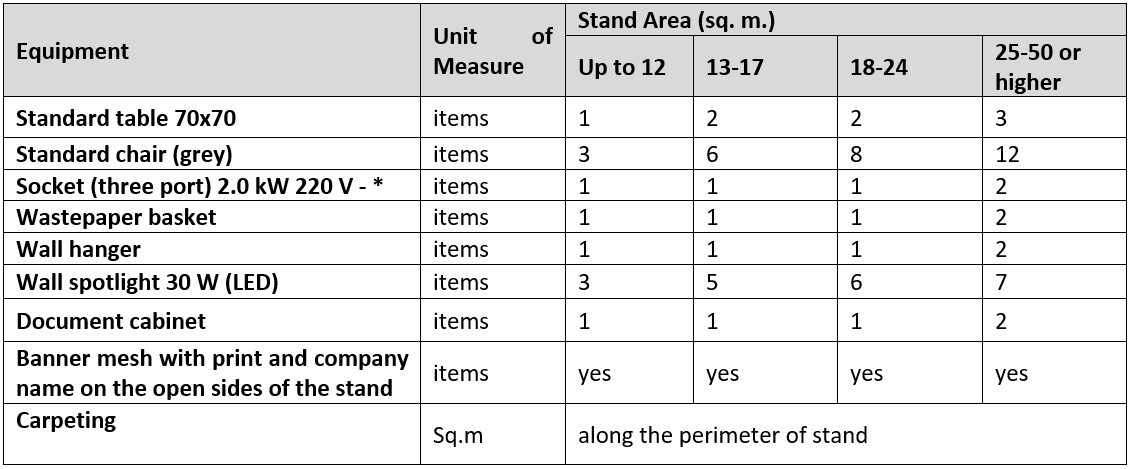
The OPTIMUM Stand package is constructed utilizing aluminum structures from the Maxima system and includes a comprehensive set of furniture and equipment, the quantity of which is scaled to your stand's area. For detailed specifications, please refer to the OPTIMUM Stand Package included in Equipment table.
The package features Raduga carpet flooring. The default color is blue, but grey, red and green are available as an optional selection.
The package features Raduga carpet flooring. The default color is blue, but grey, red and green are available as an optional selection.
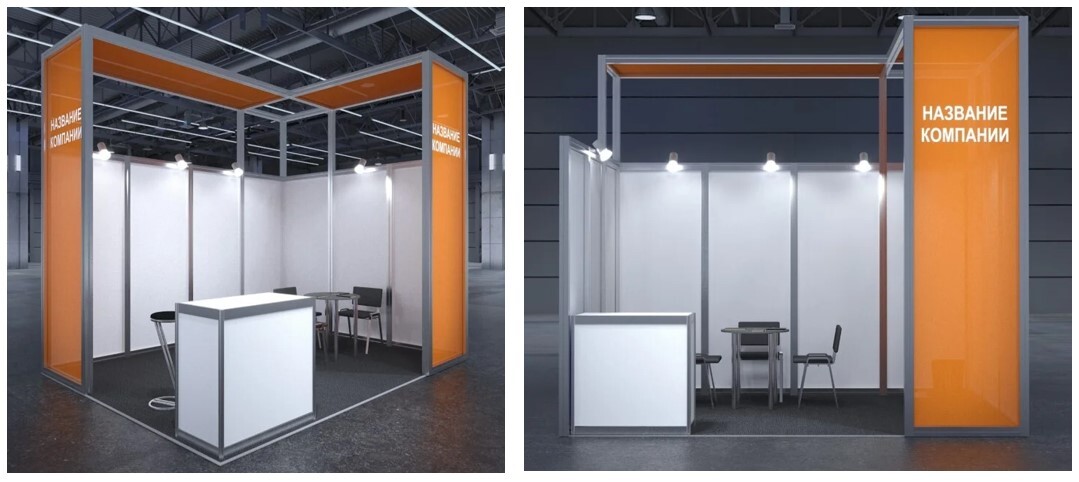
OPTIMUM Stand Specifications:
1. Construction & Dimensions
The OPTIMUM stand aluminum structure is 3.5 meters high, and the wall panels measuring 2500 mm in height and 1000 mm in width (dimensions include top and bottom planks). For detailed dimensional inquiries, please contact the Exhibition's Technical Department directly.
2. Ordering Additional Equipment
Additional equipment, furniture, and electrical appliances can be ordered via the Online Expo Configurator.
3. Banner mesh with company name
The OPTIMUM stand configuration includes banner mesh with print and company name on the open sides of the stand. Banner mesh layout dimensions:
Vertical grid:
3.5 m - 905 x 3300 mm
Horizontal (depending on booth width):
1 m - 905 x 890 mm, 2 m - 905 x 1870 mm, 3 m - 905 x 2860 mm, 4 m - 905 x 3850 mm, 5 m - 905 x 4840 mm, 6 m - 905 x 5830 mm
Additional Signage & Logos on the walls: Additional text signs or company logos can be ordered through the Online Expo Configurator.
4. OPTIMUM Stand Content
Please refer to the attached "OPTIMUM Stand Content" table for a detailed list of included items.
Important Notice: Please be advised that should an Exhibitor decline any item from the standard package, the item is neither refundable nor exchangeable for other equipment or services. Any additional requirements must be ordered separately via the Online Expo Configurator.
OPTIMUM Stand Package: Included Equipment
The following equipment is included in the Smart stand package, with quantities scaled according to the leased area.
1. Construction & Dimensions
The OPTIMUM stand aluminum structure is 3.5 meters high, and the wall panels measuring 2500 mm in height and 1000 mm in width (dimensions include top and bottom planks). For detailed dimensional inquiries, please contact the Exhibition's Technical Department directly.
2. Ordering Additional Equipment
Additional equipment, furniture, and electrical appliances can be ordered via the Online Expo Configurator.
3. Banner mesh with company name
The OPTIMUM stand configuration includes banner mesh with print and company name on the open sides of the stand. Banner mesh layout dimensions:
Vertical grid:
3.5 m - 905 x 3300 mm
Horizontal (depending on booth width):
1 m - 905 x 890 mm, 2 m - 905 x 1870 mm, 3 m - 905 x 2860 mm, 4 m - 905 x 3850 mm, 5 m - 905 x 4840 mm, 6 m - 905 x 5830 mm
Additional Signage & Logos on the walls: Additional text signs or company logos can be ordered through the Online Expo Configurator.
4. OPTIMUM Stand Content
Please refer to the attached "OPTIMUM Stand Content" table for a detailed list of included items.
Important Notice: Please be advised that should an Exhibitor decline any item from the standard package, the item is neither refundable nor exchangeable for other equipment or services. Any additional requirements must be ordered separately via the Online Expo Configurator.
OPTIMUM Stand Package: Included Equipment
The following equipment is included in the Smart stand package, with quantities scaled according to the leased area.
Notes:
The total power consumption of all equipment connected to the sockets must not exceed the rated power of the socket.
Electrical power connection and consumption are not included in the stand rental fee and will be billed as an additional service.
The total power consumption of all equipment connected to the sockets must not exceed the rated power of the socket.
Electrical power connection and consumption are not included in the stand rental fee and will be billed as an additional service.